In addition to making sure you have access to Webpush, you need to have the integration set up. Find the setup guide below.
Send small, effective push notifications directly to the recipient’s browser and drive increased traffic to your website.
See guide to setting up the Webpush integration here.
Create a campaign with Webpush
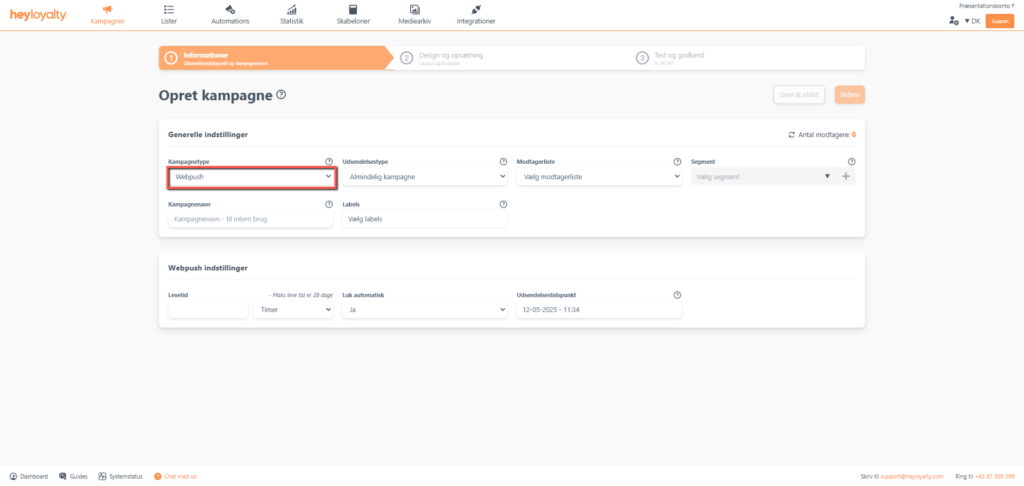
Set up your push campaign by clicking Campaigns –> Create new campaign –> Campaign type –> Web push.
Fill in the rest of the information and press Continue.
Tip: Lifespan is how long the campaign ‘lives’. Unlike email campaigns, that are sent to a recipient’s inbox and then just linger there until the recipient reads the email; a push campaign is sent to a recipient’s specific browser. Lifespan defines how many hours or days the campaign should be able to pop up in the recipient’s browser after you have sent it – i.e. how long after ‘sending’, do you want to wait for the recipient to use the specific browser in which they signed up for web push notifications? Unless your message is very time-sensitive, we recommend the default lifespan is 7 days.
If a recipient does not use the specific browser in which the recipient has signed up for web push notifications during the lifetime of the web push campaign, then the recipient will not see or receive that web push campaign.
Design your web push campaign
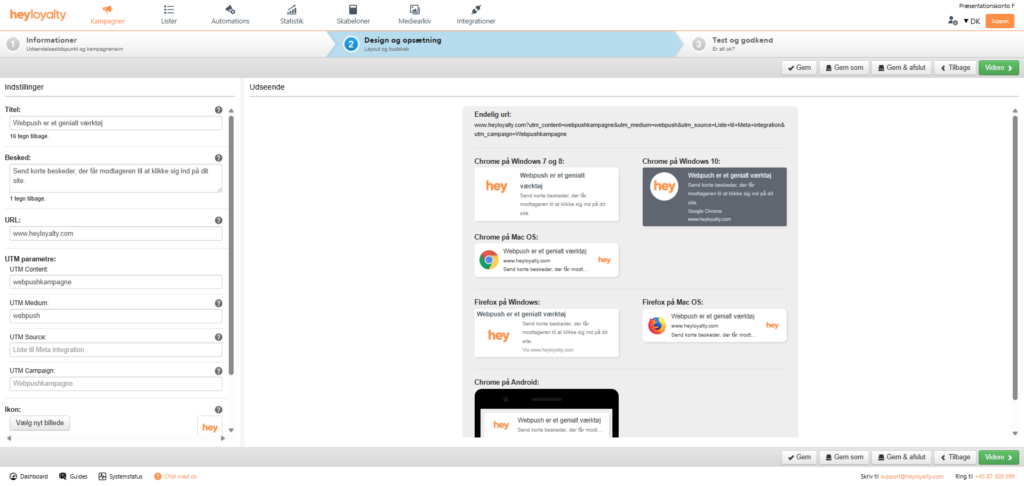
Design your campaign to meet your company’s needs and desires.
Please note that your web push campaign will look slightly different depending on which browser the message is displayed in. When you are satisfied with the design, click Next, where you can see an overview of your campaign and have the opportunity to test the URL that your web push campaign links to.
If everything is as you want it to be, you can click Approve Campaign or Confirm and send now (depends on the send time you selected earlier in the setup). Alternatively, click Save and exit and at a later date you complete the campaign or send it manually.
Hvis du mangler information eller hjælp, som du ikke finder her på guide sitet, er du altid velkommen til at kontakte vores support! support@heyloyalty.com / tlf. 87 300 399




Leave a Reply