
The value of the integration
Enhanced loyalty
Marketing automation and personalized messaging enable NGOs and member organizations to engage donors and regular supporters with tailored content, creating a deeper connection and increased loyalty.
Improved customer experience
By sending timely and relevant messages based on real-time data, NGOs and member organizations can improve the overall experience by offering valuable information, promotions, and offers that match the interests and needs of supporters.
Targeted communication
Advanced segmentation enables targeted communication, allowing NGOs and member organizations to reach specific target groups with personalized messages tailored to their demographics, preferences and behavior.
Churn Prediction and Prevention
Marketing automation tools help identify members at risk of churn by analyzing their engagement and visitor behavior and enable proactive strategies to retain them through targeted campaigns and incentives.
Streamlined processes
By automating marketing processes and using personalized messaging, NGOs and member organizations can streamline operations, save time and resources, and at the same time deliver relevant and impactful messages to their target audience.
The integration between OnlineFundraising and Heyloyalty gives you an unparalleled data foundation to automate large parts of your communication to your donors.
Before you begin
To make it easier for you, we recommend that you read the frequently asked questions and find the various documents, IDs, login information, etc. that you will need for the setup. See more below.
Frequently asked questions
Do I need a developer?
No.
How long does it take to finish setting up the integration?
10 minutes and a few minutes of preparation to find the items from the list below first.
Does the integration retrieve retroactive data?
Not automatically, but you can manually make the integration retrieve data for the last 12 months.
Do I need access to other systems?
You need access to both Heyloyalty and the Settings page in OnlineFundraising to complete the setup.
Which data is being imported?
Read the Fields in the integration section at the bottom of this page for the full overview.
Can I segment data that comes through the integration?
Yes. All data that comes through the integration can be used to segment your future communication. You can also use this data to start and stop your flows.
What you need to set up the integration
Do I need a developer? No
Can I set it up myself? Yes
Have OnlineFundraising open on the Settings page. Leave it open as you will soon need to copy some things from here. You will need the following:
- Payment API Token
- Payment Url
- DataSet API Token
- DataSet Url
The integration operates via OnlineFundraising’s API and Heyloyalty’s tracking database. Read more about Tracking here.
Setting up the integration
With the above preparation, you are now ready to set up the integration between OnlineFundraising and Heyloyalty.
Opsæt OnlineFundraising ved at klikke på Integrationer –> Listeintegrationer –> OnlineFundraising –> Opsæt integration –> Opret OnlineFundraising
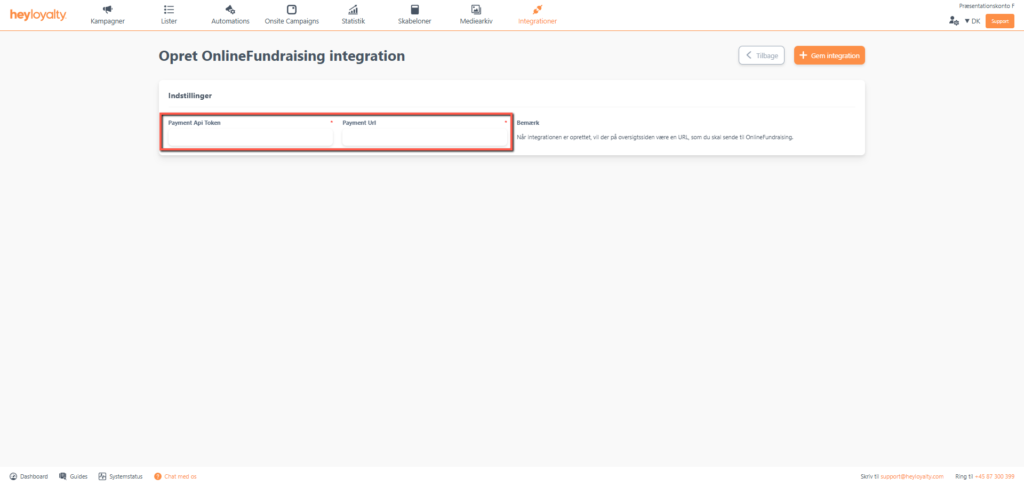
Now fill in Payment Api Token and Payment Url. These are copied from Settings in OnlineFundraising (which you should already have opened according to the preparation).
Finish with Save integration.
Click on the url under Integrations URL so that the link is copied.
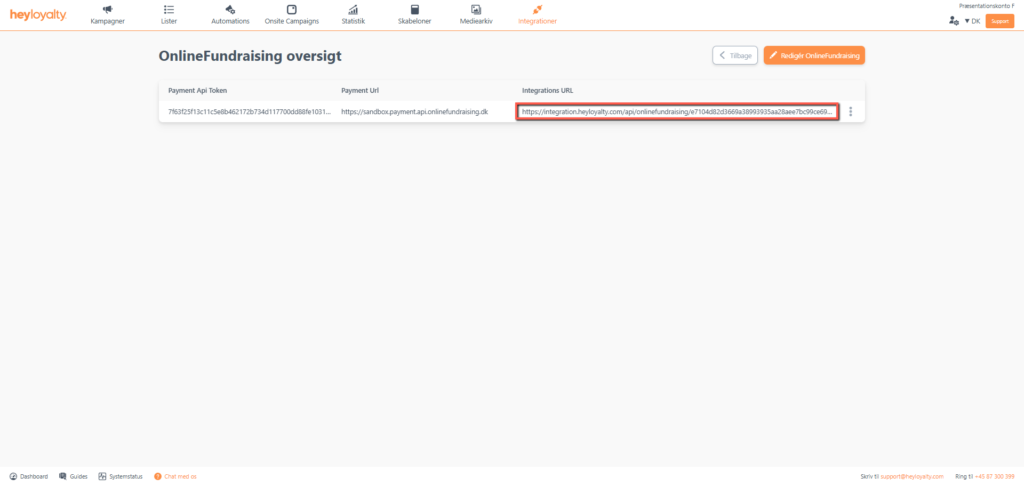
Send this link to OnlineFundraising’s support and request that they put it up in your account.
Now click ⁝ — >Edit OnlineFundraising.
Now paste the DataSet Api Token and DataSet Url. Both of these can also be found under Settings in OnlineFundraising.
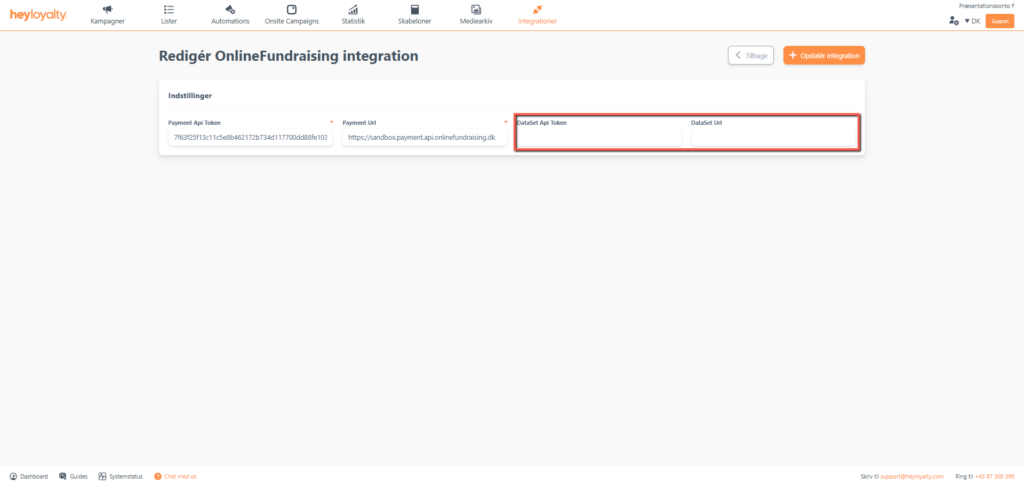
Finish with Update integration.
Your integration is now ready and will fetch all future transactions from OnlineFundraising.
If you want to import all the data you already have in OnlineFundraing, scroll down to the section Importing historical data.
General information about integration
Terminology
Heyloyalty operates with contacts (also called members). A contact can have multiple orders associated with it. A contact and a member are, in Heyloyalty’s terminology, the same thing.
An order in Heyloyalty is a subscription in OnlineFundraising.
Worth knowing about the integration
Once the integration is set up, Heyloyalty creates a contact when a contact is created in OnlineFundraising. If this contact has opted out of receiving the newsletter in connection with their registration/creation in OnlineFundraising, then it is your responsibility to unsubscribe the contact in Heyloyalty via Heyloyalty’s unsubscribe functions. Further information on this:
- The contact is NOT removed automatically in Heyloyalty when the contact cancels their subscription (i.e. cancels the paid subscription in OnlineFundraising)
- The contact is automatically updated in the Tracking database. This means you can, among other things, segment on whether the contacts in Heyloyalty have an active subscription in OnlineFundraising or not. You can also go further and segment on the fact that a contact has an active subscription (and i.e. also combine this with the value of the monthly amount)
In addition, you should be aware that all contacts created in OnlineFundraising are generally paying, which is why they are created in Heyloyalty as soon as they are created in OnlineFundraising. Elaboration is specific situations about this:
- If a contact creates a subscription in OnlineFundraising that doesn’t start until next month, that contact is created immediately in Heyloyalty. For example, a member might start a subscription on January 10th, but the first payment is February 1st . This member will be in Heyloyalty from January 10th, but according to the above segmentation options, you can segment on whether the member has an active subscription or not. In the period from January 10th to January 31st, the contact does not have an active subscription, but from February 1st, this contact will be part of segments that look at whether the contacts have an active subscription.
Importing historical data
To import historical data, click on Integrations –> List Integrations–> OnlineFundraising — > Edit Integration —> ⁝ –> Get data from OnlineFundraising.
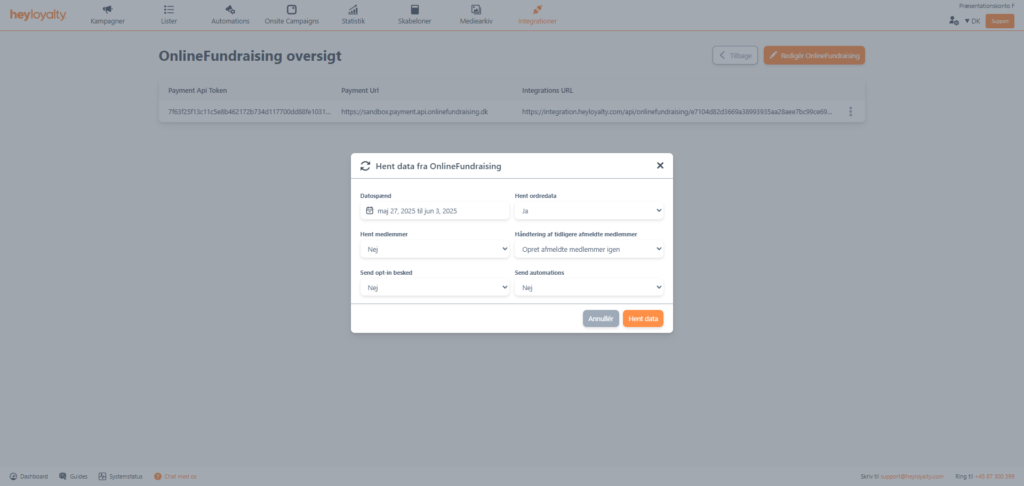
There are now six fields to consider:
- Date range
What time period do you want to retrieve data from? Is it one specific month? One week? A quarter?
TIP: You can go back up to one year. The reason why the import is limited to 12 months is that contacts who have not been communicated to within the last 12 months no longer have an active newsletter permission
- Get order data
Need to retrieve data for subscriptions, dataSet, payments, etc.
TIP: This is all data related to a payment in OnlineFundraising
- Get members
If you choose Yes, the members will be created in Heyloyalty
- How to handle previously unsubscribed members
If you are importing data for the first time, you should select Recreate previously unsubscribed members, as there are no unsubscribed members in Heyloyalty yet.
If, on the other hand, this is not the first time you have made an import of historical data, there may be some members who have been unsubscribed and who will be re-created. It is your responsibility to know who you are allowed to communicate to.
- Trigger opt-ins
If you choose No, the import will create the members without double opt-in. If you are not using double opt-in on the list, leave the field at No.
If you choose Yes, you must ensure that you have an active double opt-in automation
- Trigger automations
Any automations, such as the welcome flow or the ‘post purchase’ flow, will be sent to the members who are created in connection with the backward import if you select Yes.
These members may have had an affiliation with you for a long period of time, so consider whether it makes sense to send this type of automation in connection with this import. Often it makes the most sense to leave the field at No.
Fields in the integration
If you want a complete overview of the fields in the integration, you can see an overview here.
In general every field that is created and updated in Heyloyalty is named exactly the same as you know it in OnlineFundraising.
The above list is data that Heyloyalty retrieves in connection with a payment.

Hvis du mangler information eller hjælp, som du ikke finder her på guide sitet, er du altid velkommen til at kontakte vores support!
support@heyloyalty.com / tlf. 87 300 399


Leave a Reply